
Trading
The Trading tab: TP/SL execution mode, average price method, automatic Take Profit and Stop Loss, limit order range.
Where it is in SmartDOM
Section titled “Where it is in SmartDOM”Settings → Trading. The ? icon in the top right corner of the tab opens this article.
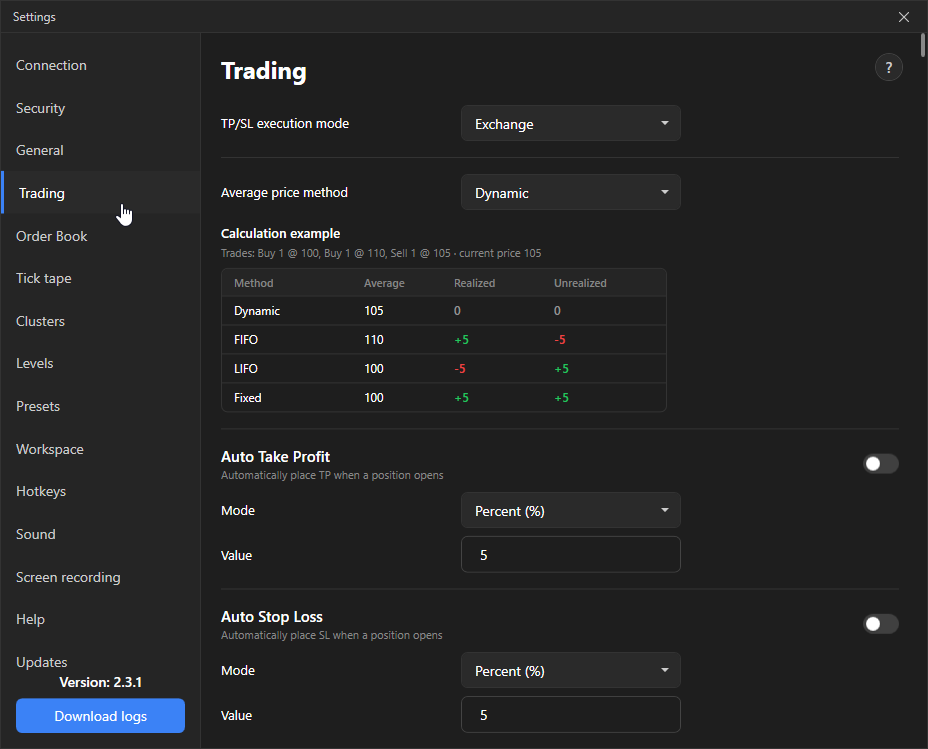
TP/SL execution mode
Section titled “TP/SL execution mode”| Option | How it works | Default |
|---|---|---|
| Local | The terminal watches the price itself and sends a market order when it is reached. Works only while the terminal is running and connected. | |
| Exchange | A conditional order is placed on the exchange. Triggers even if the terminal is off. | Yes |
In local mode closing the terminal, losing the connection or a frozen computer leaves the position unprotected.
Average price method
Section titled “Average price method”| Method | How it is calculated | Default |
|---|---|---|
| Dynamic | Volume-weighted average, as on the exchange. Recalculated when adding, unchanged on partial close. | Yes |
| FIFO | First in, first out: on partial close the earliest lots are closed. | |
| LIFO | Last in, first out: the latest lots are closed. | |
| Fixed | The average is fixed at the first entry price and does not change when adding. |
Below the list there is a worked example on the same trades for all four methods: average, Realized and Unrealized PnL.
Auto Take Profit and Auto Stop Loss
Section titled “Auto Take Profit and Auto Stop Loss”| Setting | What it does | Default |
|---|---|---|
| Auto Take Profit | When a position opens, the terminal immediately places a TP at the set distance. | Off |
| Auto Stop Loss | The same for SL. | Off |
| Mode | Distance in percent of the entry price or in points (price steps). | Percent |
| Value | The distance itself. 0 means no TP/SL is placed. | 0 |
Limit order range
Section titled “Limit order range”| Setting | What it does | Default |
|---|---|---|
| Limit order range | If the price moves away from a limit order beyond the threshold, the order is cancelled automatically. | Off |
| Mode / Value | Threshold in percent or points. | Percent / 0 |
| Setting | What it does | Default |
|---|---|---|
| Cancel limit orders when the position closes | After the position closes, all limit orders for the instrument are removed. | Off |
| Show filled order badges | Show marks in the order book at prices where orders were filled. | On |