
Tick tape
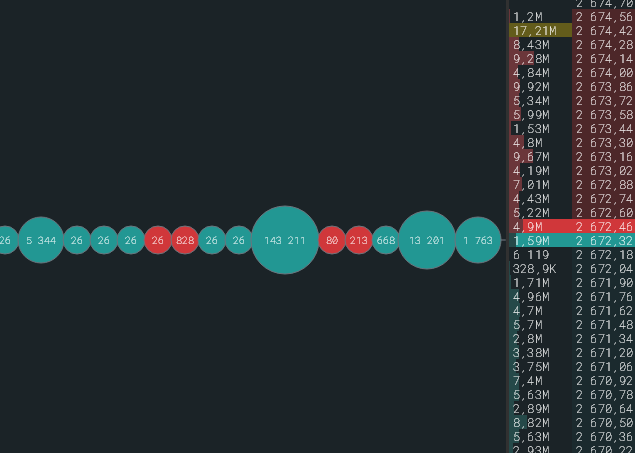
The tick tape is the stream of exchange trades next to the order book. Each trade sits at its price opposite the order book row, new ones appear on the right and push the old ones left.
What a print looks like
Section titled “What a print looks like”- Colour by direction: buys in the best bid colour, sells in the best ask colour. Colours come from the order book and chart theme.
- Size by the trade amount in dollars, in steps: up to 1,000 the smallest, up to 10,000, up to 100,000, up to 1 million, from a million the largest. Within a step prints are the same, so the large ones stand out.
- Number of the volume inside the print, in coins or dollars by the $ button, with K, M, B suffixes.
- Shape in Settings → Tick tape: capsules, circles for a dense tape, or line, when prints are not drawn at all and only the tick line remains.
- Print overlap, % compresses the step between neighbours, the numbers do not overlap.
Binding to the order book
Section titled “Binding to the order book”A print sits at its fill price. When the order book is scrolled or compressed, the tick tape moves with it; with compression the print lands in the enlarged row. If the print price is outside the visible area, it is not drawn but still takes its place in the tick tape. A tick line runs along the tick tape: Tick line and volume as a number.
Filters
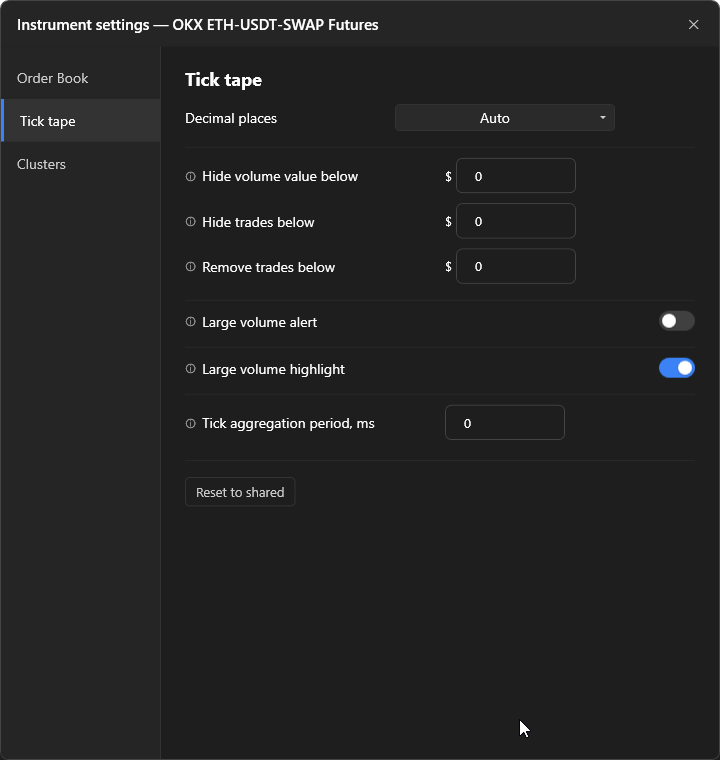
Section titled “Filters”In the panel gear, “Tick tape” tab, all thresholds in dollars:
| Setting | What it does |
|---|---|
| Aggregate ticks over a period, ms | Trades within the period are merged into one print with the sum of volumes, the side by the larger volume. Such a print is drawn as a rectangle. 0 disables. |
| Hide volume value below | The print is drawn without the number and half the size. |
| Hide trades with volume below | The print is not drawn but takes its place and remains as a point on the tick line. |
| Remove trades with volume below | The trade does not get into the tick tape at all and does not move it. |
Width and hiding
Section titled “Width and hiding”The tick tape width is changed by dragging the splitter between the tick tape and the order book. A double click on the clusters expands them to full width and hides the tick tape, another double click brings it back.