
Lead–Lag flip screener
The flip screener looks for moments when the price on one exchange jumped and on another has not caught up yet: the leader exchange moved, the trading exchange lags, and for a short time a divergence beyond the usual spread between the exchanges appears.
The screener only shows the signal and statistics. There is no automatic entry.
Where it is
Section titled “Where it is”Top bar → Windows → Flip screener. The “Flip screener settings” button expands the parameters, “Clear” deletes the history with confirmation. The diagnostics line at the bottom: the number of tracked pairs, the data delay of each exchange, the calculation time.
How it works
Section titled “How it works”- You choose the leader exchange with an icon and the trading exchanges. The signal is calculated for each leader and trading pair for the instruments present on both.
- The Auto checkbox next to the leader: the terminal itself assigns as leader the exchange that, by statistics, moves the instrument first more often. While there is little statistics, the leader is the one selected with the icon.
- The usual spread between the exchanges is remembered as the basis. A signal appears when the leader made a move of at least “Min. leader move” within the “Over time” window and the divergence with the trading exchange exceeded “Min. divergence” above the basis. If the trading exchange is already halfway to catching up, there is no signal.
- EDGE is the divergence minus two taker fees of the trading exchange, entry and exit. Signals below “Min. EDGE” are not shown.
- The signal closes when the divergence has converged, or by the convergence timeout, then the “Signal” column shows a dash. After closing a pause applies to the pair.
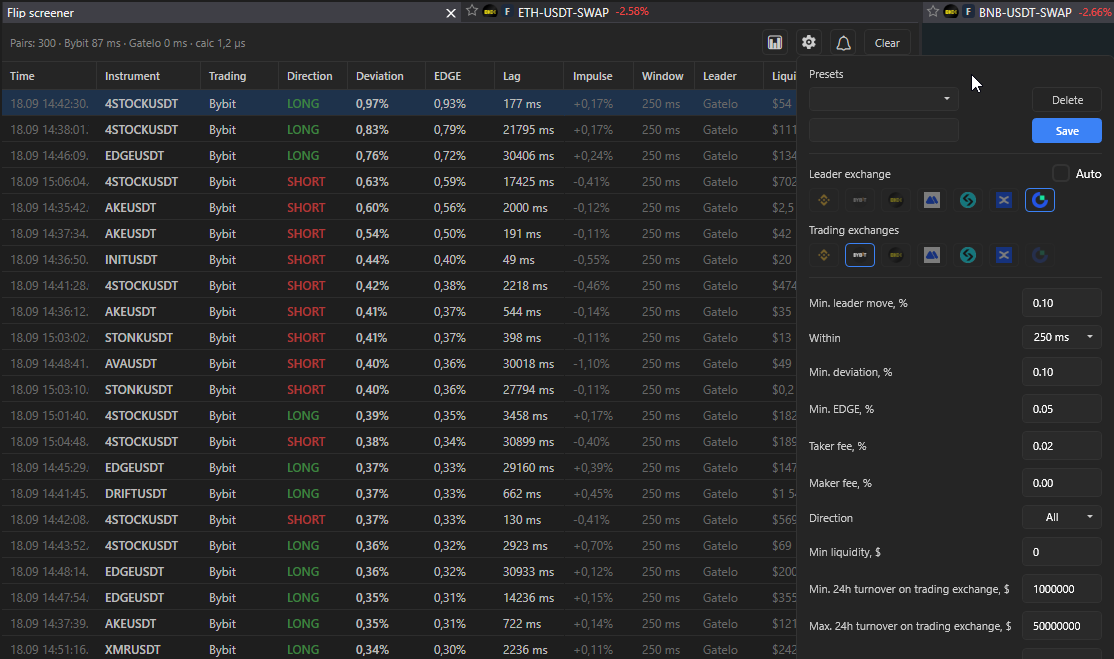
| Column | Meaning |
|---|---|
| Time | of detection |
| Instrument, Leader, Trading | |
| Direction | LONG or SHORT on the trading exchange |
| Impulse | leader move, % |
| Time | impulse window |
| Divergence | above the basis, % |
| Liquidity | amount at the best level of the trading exchange |
| Signal | FLIP, closed or a dash by timeout |
| EDGE | % |
| Lag | data delay |
Hovering over a row shows the leader and entry prices, the basis, the maximum divergence and EDGE, the data delays. The mark “Data with increased delay — the signal is unreliable” warns that the quotes are late. Right click: open two order books, the trading exchange and the leader, or one of them.
Settings
Section titled “Settings”| Setting | What it does |
|---|---|
| Min. leader move, % and Over time | threshold and window of the leader impulse |
| Min. divergence, % | above the usual spread between the exchanges |
| Min. EDGE, % | after deducting two taker fees |
| Taker fee, % | of the trading exchange; Maker is for reference, not part of EDGE |
| Direction | All, LONG, SHORT |
| Min. liquidity, $ | amount at the best level of the trading exchange, ask for LONG and bid for SHORT; 0 disables |
| Min. and max. 24h turnover on the trading exchange, $ | cuts off illiquid and heavy coins like BTC and ETH, which never flip |
| Max. pairs | ceiling of tracked pairs per exchange combination |
| Pause after flip, s | pair cooldown |
| Convergence timeout, s | when to consider the signal not converged |
| Confirm with the next update of the trading exchange | the signal appears only if after the leader’s jump a fresh order book of the trading exchange arrived and the divergence persisted; removes false windows at the cost of a delay of up to 300 ms |
| Leader reference in the order book | a line with the current leader price is drawn in the trading exchange order book, for example “BINANCE 1.0248” |
| Presets | save and delete a set of settings |
Statistics by instrument
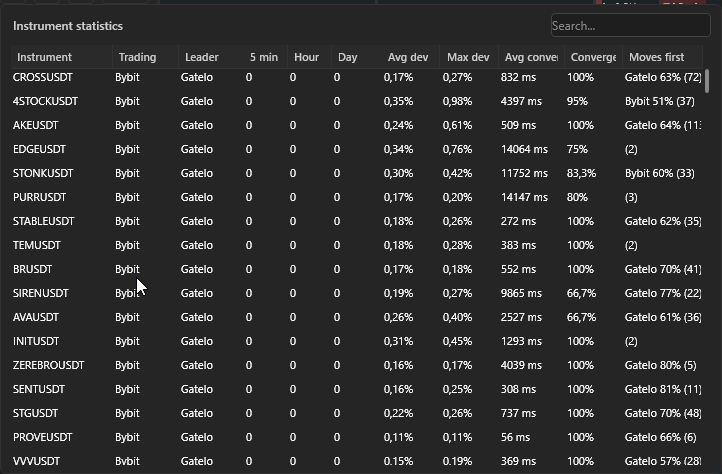
Section titled “Statistics by instrument”A separate table: how many flips over 5 minutes, an hour and a day, average and maximum divergence, average convergence time, share of converged, “Moves first” — which exchange moves the instrument first most often. Sorted by flip frequency per hour by default.
Alerts
Section titled “Alerts”Sound separately for LONG and SHORT and the “Flip” pop-up. Samples in Settings → Sound.