
Impulse screener
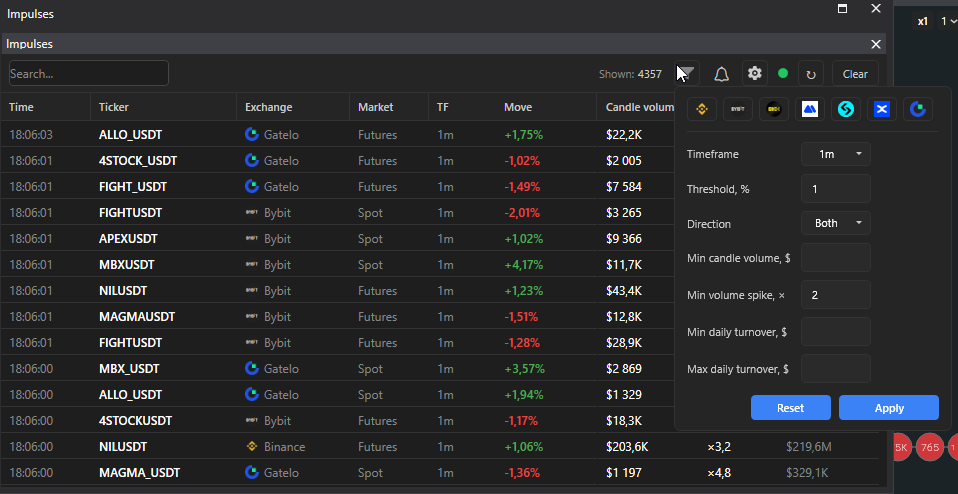
The impulse screener catches sharp price moves across the whole market: a candle of the selected timeframe rose or fell by the set percentage. The scanning is done by the SmartDOM server, the terminal receives ready events.
Where it is
Section titled “Where it is”Top bar → Windows → Impulses. Status circle: “Connected to the impulses server” or “No connection”. The ↻ button reconnects and refreshes the history.
| Column | Meaning |
|---|---|
| Time | when the impulse happened |
| Ticker, Exchange, Market | |
| TF | candle timeframe |
| Move | price change over the candle, % |
| Candle volume | in dollars |
| Spike | how many times the candle volume is above the usual |
| 24h turnover | daily turnover of the instrument |
A click on a row opens the instrument. “Shown:” is the number of rows after the filters. The “Clear” button deletes the whole saved history, with confirmation.
Settings
Section titled “Settings”Expanded with the “Settings” button inside the panel.
| Setting | What it does |
|---|---|
| Timeframe | the candle by which the move is measured |
| Threshold, % | minimum move per candle |
| Direction | Both, Up, Down |
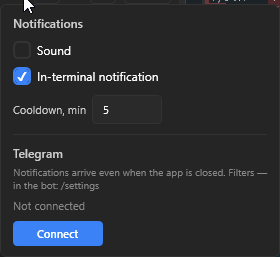
| Cooldown, min | pause between alerts for one instrument on one exchange. Mutes only the sound and pop-ups, all events get into the table |
| Auto-clear, h | after how many hours events are removed from the table |
| Min. candle volume, $ | cuts off impulses on empty volume |
| Min. volume spike, × | candle volume to the median of the ten previous candles of the same timeframe, for example 3 means at least three times the usual; empty disables |
| Min. and max. daily turnover, $ | cuts off illiquid and too large instruments |
Alerts
Section titled “Alerts”- Sound and Notification in the terminal: the “Impulse” pop-up. To avoid spam, the sound plays at most once every three seconds, no more than three windows at once, the rest collapse into “N more impulses”.
- Telegram. The “Connect” button shows “Waiting for confirmation in Telegram…”, confirm the link in the bot. After that notifications arrive even with the terminal closed, the filters for them are set in the bot with the /settings command. Statuses: Not connected, Connected, Paused (the /resume command in the bot), Server unavailable. “Disconnect” removes the link.
Good to know
Section titled “Good to know”- Order book and chart panels can be linked to the impulses: Linking panels.
- The 3m timeframe on MEXC, Bitget, BingX, KuCoin and Hyperliquid is assembled from minute candles, the event is confirmed by the exchange data.