
Tick tape
The Tick tape tab: tick tape mode, its sizes and sweep merging, and common settings of tape panels.
Where it is in SmartDOM
Section titled “Where it is in SmartDOM”Settings → Tick tape. The ? icon in the top right corner of the tab opens this article.
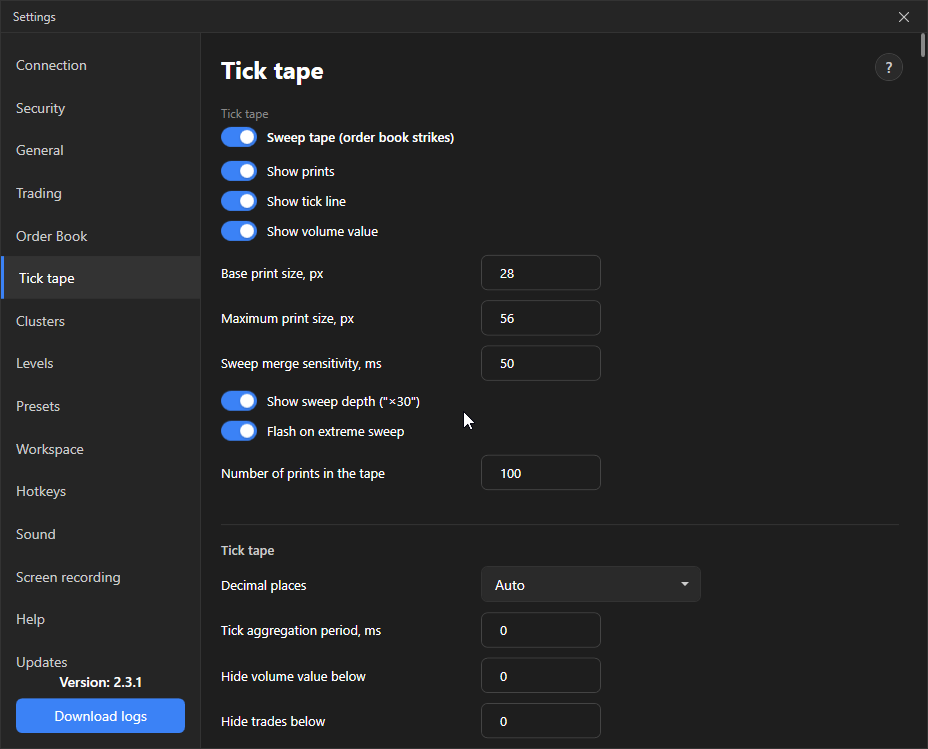
Sweep tape (order book sweeps)
Section titled “Sweep tape (order book sweeps)”The main switch of the tab.
Off: the regular tape, every exchange trade is drawn as its own tick, size depends on volume.
On: the tick tape merges the fills of one aggressive order into a single print, the size shows how deep it went through the order book, “×N” marks, large prints and a flash on extreme sweeps appear. Off by default.
Regular tape only
Section titled “Regular tape only”| Setting | What it does | Default |
|---|---|---|
| Tape tick shape | Capsules, Line or Circles (dense tape). | Capsules |
| Print overlap, % | How much neighbouring prints overlap each other. 0: edge to edge. More: a denser tape. Volume numbers do not collide. | 0 |
Sweep tape only
Section titled “Sweep tape only”| Setting | What it does | Default |
|---|---|---|
| Show prints | Draw the prints themselves. | On |
| Show tick line | A line of actual fill prices along the tick tape, a micro-chart of the last price next to the order book. | On |
| Show volume as a number | Volume label on the print. | On |
| Base print size, px | Circle size of a regular print. The same at any volume: the number shows the volume, the size shows the strength of the sweep. | 28 |
| Maximum print size, px | Size cap so the tick tape does not cover the order book. | 56 |
| Sweep merge sensitivity, ms | Maximum time gap between fills of one order. 0 disables merging. | 50 |
| Show sweep depth (“×30”) | How many different prices one order took. Only on sweeps that took more than one price. | On |
| Flash on extreme sweep | A short outline around a print that hit the maximum size. Fades in 300 ms. | On |
| Number of prints in the tick tape | Buffer size. The screen shows as many as fit in the width. | 100 |
Tick tape (common panel settings)
Section titled “Tick tape (common panel settings)”| Setting | What it does | Default |
|---|---|---|
| Decimal places | Auto with K/M/B suffixes or 0–4 digits. | Auto |
| Aggregate ticks over a period, ms | Several trades within the period are merged into one tick. 0 disables. | 0 |
| Hide volume value below | Trades below the USD amount are drawn without the volume label. 0 disables. | 0 |
| Hide trades with volume below | Trades below the amount are not drawn but still move the tick tape. | 0 |
| Remove trades with volume below | Trades below the amount are excluded from the tick tape entirely. | 0 |
| Notification: large volume detected | Sound on a tick with a large volume. | Off |
| Large volume threshold (USD) | Minimum trade volume for the notification. | 0 |
| Large volume highlighting | Size, brightness and outline of the tick depend on the volume. Thresholds come from “Large volume 1/2” in the order book settings, colours from the theme. | On |
The Apply to all button is the same as on the Order book tab: it switches all panels to the common settings and erases their personal values.