
Bybit
How to connect a Bybit account to SmartDOM with an API key and what the terminal can do with this connection.
What the connection gives you
Section titled “What the connection gives you”Once connected, SmartDOM shows the account’s balances and positions, keeps the list of orders and lets you trade from the order book. Without a connection the exchange is available for viewing quotes only.
| Parameter | Value |
|---|---|
| Markets for trading | Spot and Futures (USDT-perpetual) |
| Passphrase when connecting | Not required |
| Demo trading (testnet) | No |
Where it is in SmartDOM
Section titled “Where it is in SmartDOM”Settings → Connection → “+ Add connection”.
Step by step
Section titled “Step by step”- Create an API key in your Bybit account. Which permissions to enable: Creating API keys and required permissions.
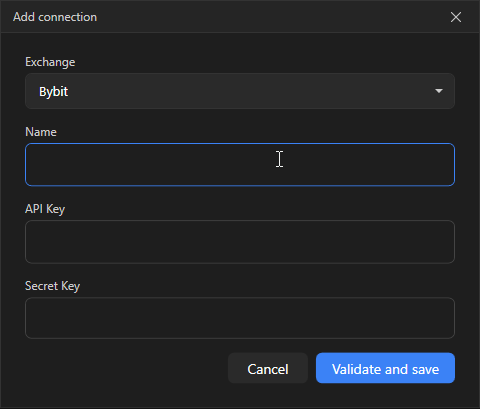
- In SmartDOM open Settings → Connection and click + Add connection.
- In the Exchange field select Bybit.
- In the Name field enter any clear name, for example “Bybit main”. It is used to tell connections apart.
- Paste the API Key and Secret Key.
- Click Verify and save. The terminal contacts the exchange and makes sure the keys work. While checking, “Verifying keys…” is shown.
- The new connection appears in the list with the status Disconnected. Click Connect to start trading.
- SmartDOM works with the Unified Trading Account: balances and positions come from the single Bybit wallet. That is why the connection card says “Unified Account”; you can trade both spot and futures.
- When verifying the key the terminal requests the unified wallet balance.
Common errors
Section titled “Common errors”- “Invalid API keys”: the key was copied incompletely, deleted on the exchange or created for another account. Create a new key and paste it again.
- “Local clock is out of sync with the exchange (>30 s)”: enable automatic time synchronisation in Windows.
- “IP address is not in the API key whitelist”: the key has an IP restriction on the exchange and your address is not on the list.
- “The API key has insufficient permissions. Enable Read and Trade.”: account reading and trading permissions were not ticked when creating the key.
The full list of messages and what to do about them: Common connection errors.