
High ping / delay
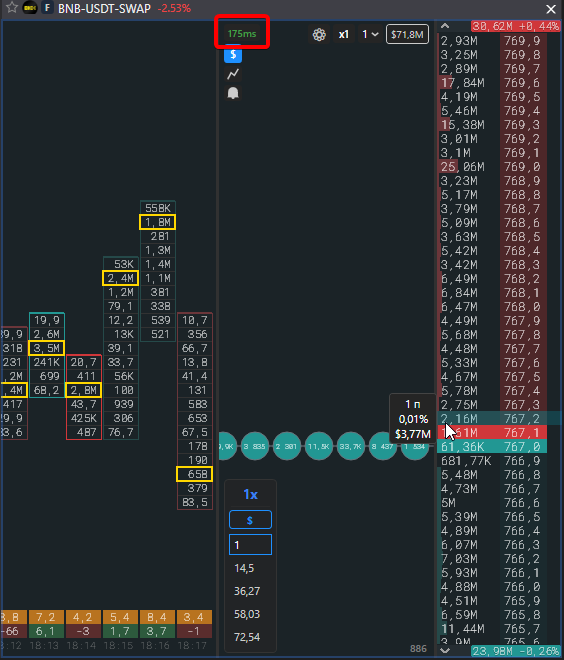
The ping in the corner of the order book shows how much time passes from the exchange sending the data to it appearing on the screen. This is the network delay between you and the exchange servers, not the speed of the terminal itself.
How to read the indicator
Section titled “How to read the indicator”| Colour | Delay | Meaning |
|---|---|---|
| Green | up to 400 ms | normal |
| Orange | up to 800 ms | noticeable delay |
| Red | more than 800 ms | the order book lags behind the market |
| — | no data | the stream is not running or the exchange does not send time |
The value updates once a second. In the flip screener the delay of each exchange is visible in the diagnostics line and the Lag column.
Where the delay comes from
Section titled “Where the delay comes from”- Distance to the exchange servers and the provider’s route. Different exchanges have servers in different regions, so the ping differs by exchange.
- A VPN adds its own hop. Sometimes the route through the VPN is shorter, sometimes longer; compare with and without it.
- Wi-Fi and mobile internet produce spikes. A wired connection is more stable.
- Many open panels and charts load the computer and the picture updates more slowly. Close what you do not need: System requirements.
How it affects trading
Section titled “How it affects trading”- The price in the order book and on the exchange website may differ at the moment of a spike.
- An order goes to the exchange with the same delay, a market fill may happen at a different price.
- On a full loss of the stream the terminal does not send orders and shows “The order book lags behind the market”.
What to do
Section titled “What to do”- Check the ping on several exchanges: if it is high only on one, the route to it is the problem.
- Try with and without a VPN, by wire instead of Wi-Fi.
- Close other programs that load the network: torrents, cloud sync, video.