
General
The General tab: interface theme, order book font, language, instrument search order across exchanges and settings export/import.
Where it is in SmartDOM
Section titled “Where it is in SmartDOM”Settings → General. The ? icon in the top right corner of the tab opens this article.
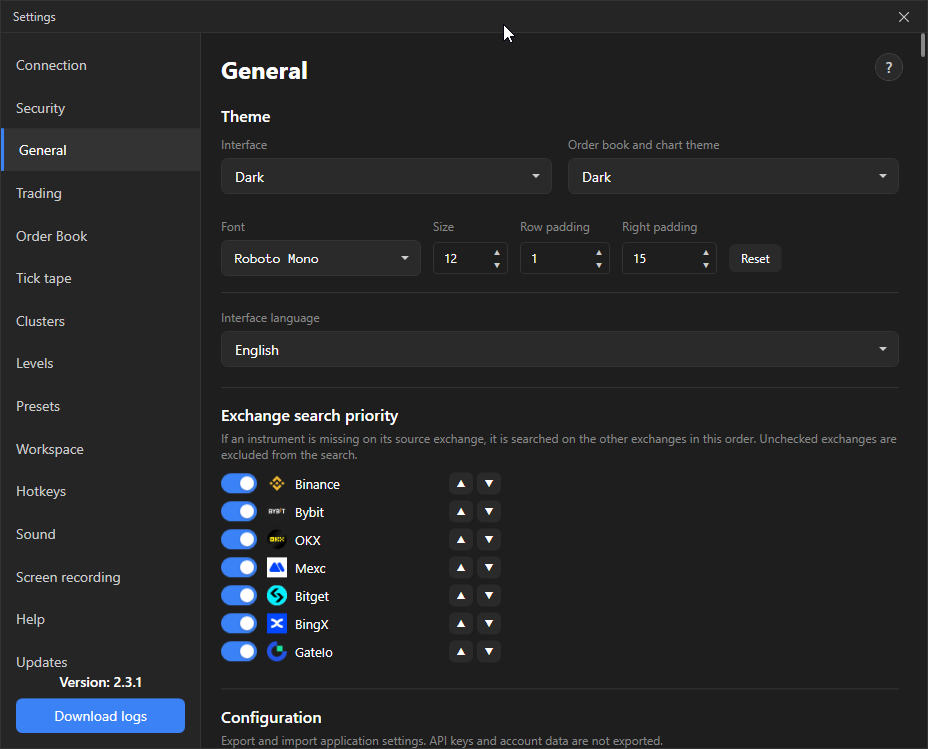
| Setting | What it does | Default |
|---|---|---|
| Interface | Theme of the terminal windows: Light, Dark or System (follows Windows). | |
| Order book and chart theme | Colours of the order book, tape and chart. There are built-in Light and Dark themes; your own are created with “+ Create new theme”. A custom theme has edit and delete buttons in the list. |
Render font
Section titled “Render font”| Setting | What it does | Default |
|---|---|---|
| Font | Typeface of the text in the order book, tape and clusters. | system |
| Size | Font size, 8 to 24. | 11 |
| Row padding | Padding above and below the text in an order book row, 0–20. More padding means taller rows and fewer levels on screen. | 0 |
| Right padding | The area to the right of the order book for order badges, 0–60. Less: the cross and badge overlap the price. More: an empty zone, orders do not touch the price. | 15 |
The Reset button returns the font and paddings to their defaults.
Interface language
Section titled “Interface language”Russian or English. Applies immediately, without a restart. The help center opens in the selected language.
Exchange search priority
Section titled “Exchange search priority”If an instrument is not on the original exchange, the terminal looks for it on the others in this order. The ▲ ▼ arrows change the order; an unticked box excludes the exchange from the search.
Configuration
Section titled “Configuration”| Button | What it does | |
|---|---|---|
| Export settings | Saves the terminal settings to a ZIP file. | |
| Import settings | Loads settings from a ZIP file. | |
| Share theme | Exports the selected custom themes as separate .tstheme files. | |
| Load theme | Imports a .tstheme file into the theme list. |
API keys and account data are not included in the export. On a new computer the connections have to be added again.