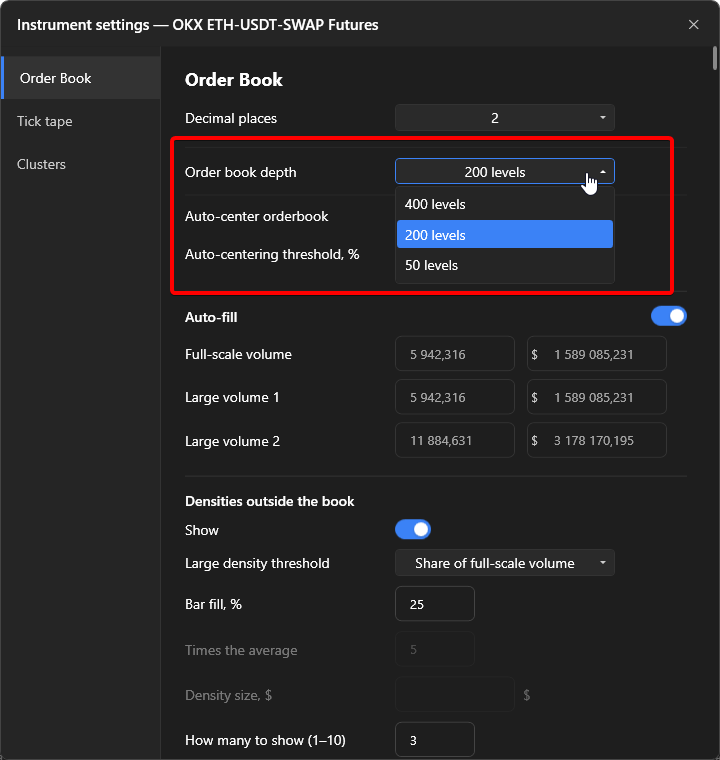
Order book depth and auto-centering
How many levels the order book receives, how it scrolls and when it returns to the spread on its own.
Scrolling
Section titled “Scrolling”- The mouse wheel over the order book scrolls the price ladder. “Scroll speed” in Settings → Order book sets how many rows pass per click: from 1 to 20, default 5.
- The Shift key puts the spread in the middle. Order books in all open windows are centered.
Auto-centering
Section titled “Auto-centering”When the spread moves from the center towards the edge of the visible area, the order book moves to the spread by itself. “Auto-scroll threshold, %” sets how far along the way from the center to the edge the spread must go: 100% means right at the border; the higher the value, the less often the order book jumps. Range 10–100, default 60.
Auto-centering does not fire while the cursor is over the order book, so as not to interfere with manual scrolling, and while a price or signal level is in the visible area: once you scrolled to a level, the order book is not taken away from it. As soon as the cursor leaves the panel, auto-centering works again.
Enabled and configured in the panel gear and in the common settings.
Order book depth
Section titled “Order book depth”How many levels per side the terminal requests from the exchange. Three options, the number of levels depends on the exchange:
| Exchange | Max | Medium | Minimal |
|---|---|---|---|
| Binance, MEXC, BingX | 1000 | 500 | 100 |
| Bybit | 200 | 100 | 50 |
| OKX | 400 | 200 | 50 |
| Bitget | 200 | 100 | 50 |
| Gate | 400 | 200 | 50 |
| KuCoin | 500 | 200 | 50 |
| Hyperliquid | 20 | 20 | 20 |
By default “Medium” for Binance, MEXC and BingX, “Max” for the others. The depth also sets the ceiling for the off-screen density search: Densities. Switched in the panel gear, “Order book” tab, or in the common settings.