
Listings and other panels
Panels that help find instruments: “Listings”, the quotes screener and an overview of the other terminal panels.
Listings
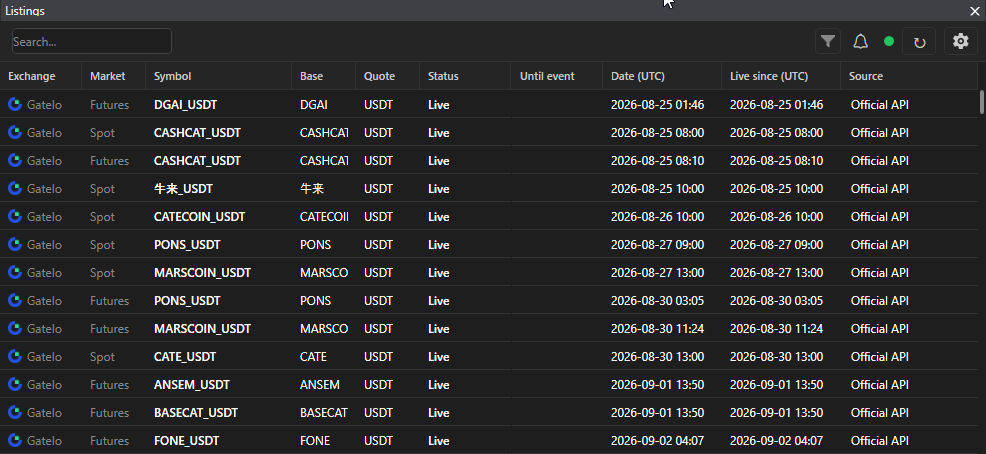
Section titled “Listings”Top bar → Windows → Listings. A table of new and departing instruments on the exchanges, data from the SmartDOM server.
- Filters: Upcoming, Trading, Delistings, plus search.
- Columns: exchange, market, symbol, base, quote, status, time to event (countdown), UTC date, live s, source.
- Statuses: Announced, Upcoming, Trading, Delisting.
- Listing notification: the “1 hour”, “15 minutes”, “5 minutes”, “Listing” checkboxes. At the chosen moments a pop-up appears and the “Listing start” sound from Settings → Sound plays.
- A double click opens the instrument’s order book; for an upcoming listing the order book waits for the trading start. Right click: “Open on the exchange”.
- The circle in the corner: green “Connected to the listings server”, red “No connection”. The ↻ button reconnects.
- In the panel settings: “Shorten text”.
- An order book or chart can be linked to the listings: when moving through the rows they follow the selection, only in the main window.
Screener (quotes)
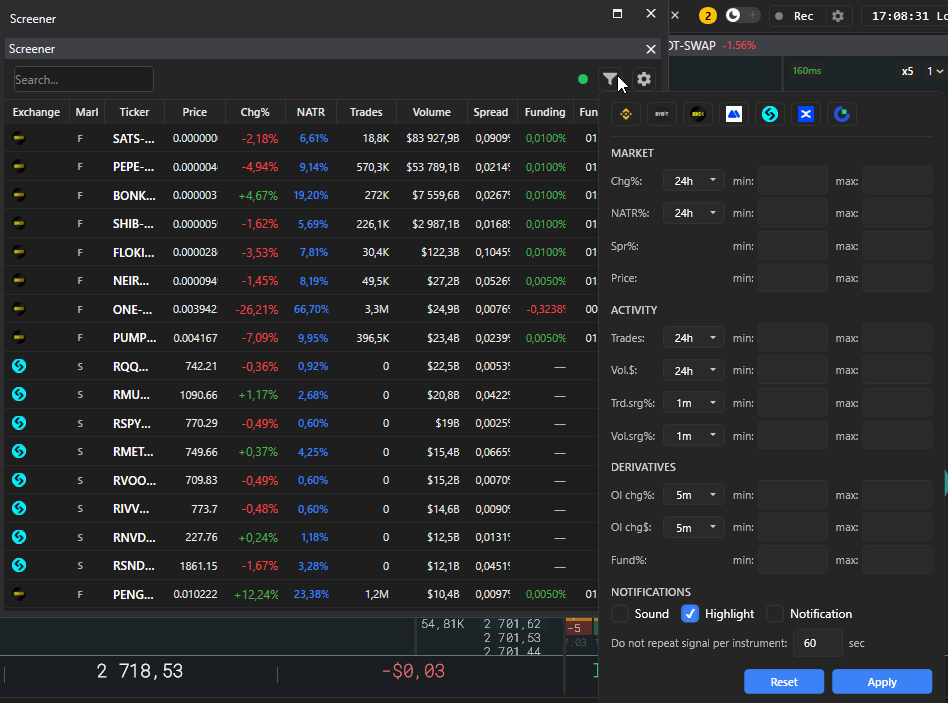
Section titled “Screener (quotes)”Top bar → Screener. A real-time table of instruments of the selected exchanges and markets.
- Columns: exchange, market, ticker, price, change %, NATR %, trades, turnover $, spread %, volume spike %, trades spike %, funding, time to funding.
- Filters: exchanges and markets, minimum and maximum for each value with its own timeframe, “Apply” and “Reset”. Volume and trades spike is the percentage above what is usual for the instrument.
- Search by ticker, sorting by any column, auto-refresh every N seconds.
- Several screeners with different filters, renaming.
- Notifications: sound and highlighting when a new instrument enters the selection. The “New instrument in the screener” sample in the sound settings.
- A double click opens the order book, the context menu opens it on all exchanges. The link button links a window to the screener: press it and click the window you want.
- Status circle: “Connected to the data server” or “No connection to the data server”.
Other panels
Section titled “Other panels”| Panel | Purpose | Article |
|---|---|---|
| Impulses | sharp price moves across the whole market | Impulse screener |
| Flip screener | the price of one exchange lagging behind another | Lead–Lag flip screener |
| Orders, Positions, History, PnL | trading records | Orders, Positions, Trades, Financial result |
| Trader’s diary | reasons and comments for trades | Trader’s diary |