
Trades
The “History” panel shows closed trades with the result and fee.
Where it is
Section titled “Where it is”Top bar → Windows → History.
Each row is a trade from entry to exit: direction, entry price, exit price, points, volume, fee, PnL, entry and exit time, number of ticks. A row expands into the list of fills: time, type, price, volume, fee and PnL of each part.
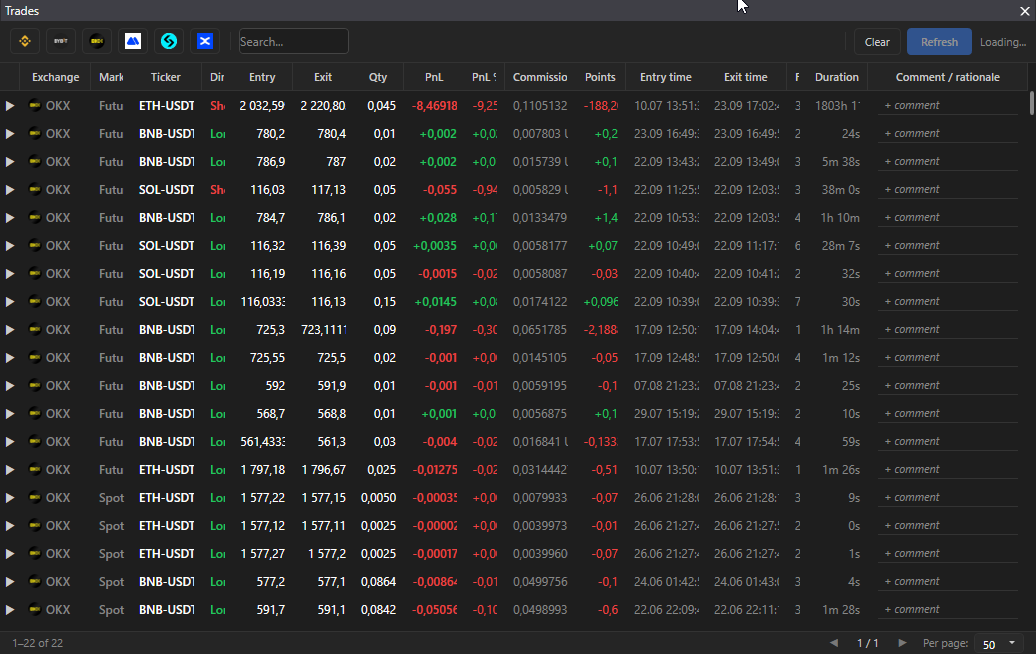
- Spot and futures, exchange chips as in “Orders”.
- Search by ticker.
- Sorting by clicking a header, hiding columns with a right click.
- The “Clear history” button.
Good to know
Section titled “Good to know”- Without a connected exchange the panel shows “Set up API keys in Settings → Connection”.
- History is loaded from the exchange, the depth is limited by the exchange: Binance spot unlimited, futures 6 months; Bybit 2 years; OKX 3 months; MEXC spot 30 days, futures 90; Bitget 90 days; KuCoin spot 7 days, futures 3 months.
- The trade result is calculated by the terminal from your fills and may differ from the exchange website by fees and rounding.
- This history is not connected to the “Trader’s diary”.