
Sweep depth and extreme sweeps
How the sweep tape labels the sweep depth and marks the strongest sweeps.
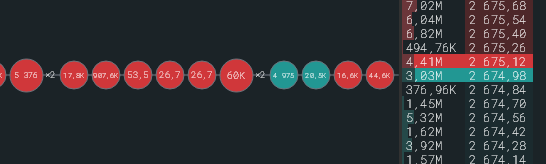
Sweep depth “×N”
Section titled “Sweep depth “×N””To the right of the circle the tick tape writes how many different prices one order took, for example “×30”. The label appears only on sweeps that went through more than one price. The “Show sweep depth” switch is in Settings → Tick tape.
Extreme sweep
Section titled “Extreme sweep”A sweep that took 13 prices or more is considered extreme: the circle hits the maximum size and does not grow further. So that such a sweep is not lost, a ring flashes around the print for 300 ms, the “Flash on extreme sweep” switch. At the same time the “Extreme sweep” sound plays if it is enabled in Settings → Sound. The sound is only for extreme sweeps: an active instrument has hundreds of regular ones per minute.
Large print
Section titled “Large print”Separately from the depth: a print with an amount above the “Large volume notification” threshold is outlined in a contrasting colour. An amount of $500,000 at one price is a large print but not a sweep. Works with “Large volume highlighting” enabled: Large volume notifications.